






- NEW VIDEO TUTORIAL
- HOME PAGE FOR THE WEB APP
- TOURNAMENT INFO PANEL AT THE POKER TABLE
- EXPECTED TOURNAMENT DURATION

For this release we have created a new video tutorial for the Twister Boost feature in addition to the existing tutorial for the Run It Twice feature.
We have also made the video tutorials available in the web app. In the other apps, the web app’s 'Video tutorials' page is accessible through the lobby.

To improve player experience we have developed a brand-new home page for our web app. The new home page is the main entry point to all lobbies. It allows you to quickly select a game and open the corresponding view, check your balance and navigate to the different pages of the app.
The home page consists of various widgets. Similar to the home page of the mobile app, the home page of the web app also consists of the following widgets:
- Welcome widget - this widget is used to welcome you.
- Banner widget - the widget is used to display and rotate multiple banners.
- Game widget - this widget contains tiles that lead to different game views.
- Featured Widget - this widget contains tiles that can be swiped horizontally. These tiles can lead to different games and pages within the app
Example of the home page of the web app on mobile and desktop devices:
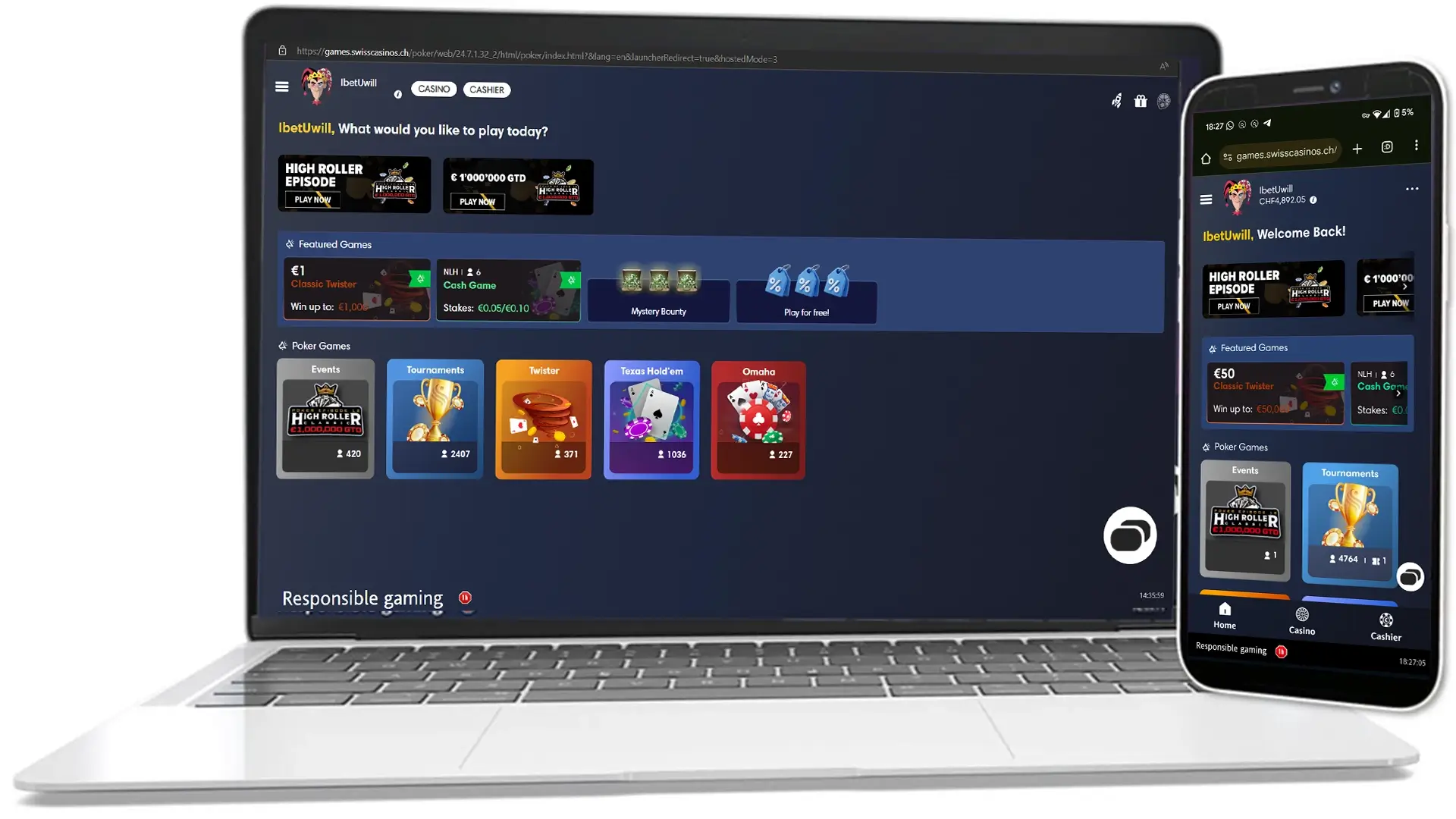
The new home page is available in the desktop and mobile app versions of the web app.
To improve player experience we have redesigned and improved this version’s tournament info panel at the poker table so that you can quickly access the most important information about the current tournament. The redesigned tournament info panel with all newly-introduced fields is available for multi-table tournaments in the desktop and the mobile apps.

Note: To provide a better experience for players, we have also applied the new graphics to the tournament information panels of the Twister and Sit&Go tournaments. In other words, the tournament info panels of these tournaments now appear with the new graphics, but the information within the panels has not been changed (it is the same information as before).
Example of the newly designed tournament info panel in a Sit&Go tournament: 
In the desktop app there are two views of the tournament info panel - the compact view and the full view.
The compact view appears as soon as you sit at the respective tournament table.

As you can see above, the compact view replaces the old tournament info panel, comes with a new design and shows relevant information depending on the tournament phase.
1. For tournaments with late registrations, the compact tournament info panel provides information about:
- The current level and the time remaining until the next level.
- The time remaining until the end of late registration (Late-Registration).
- The prize pool of the tournament.
- The current rank of the player.
2. For tournaments with completed late registration (Late-Registration), the compact tournament info panel offers identical information with the following differences:
- For regular MTTs, the Late registration field is replaced by the Next payout field.
- For 'Day-1' Flight events, depending on the configuration, the field for Late Registration is either replaced by a field showing the levels remaining until the end of the 'Day-1' event ('Levels remaining' field) or by a field showing the number of players to be dropped for the end of the 'Day-1' event ('Players to be dropped' field).
3. For tournaments that are in the final table phase, the compact tournament info pop-up window still displays information about the level, rank, next payout and prize pool. However:
- If the tournament is configured with Tournament Deals (to be launched soon), the Next payout field will change with the ICM value field showing the value the player will win when a deal is made.
- The prize pool field for regular MTTs shows the total of all remaining prizes, while the prize pool field for 'Day-1' Flights shows the currently accumulated prize pool for the main 'Day-2' event.
If you want to open the full tournament info panel in the desktop app, you can click anywhere in the compact tournament information view. The full view will then be displayed as an overlay on the table.

As you can see in the picture, the complete tournament info panel shows a detailed overview of the current tournament.
For regular MTTs (including 'Day-2' Flights and Satellites) the panel shows the following:
- Information about the total prize pool of the tournament at the top of the page.
- Info about the prize for first place, as well as the next payout prize. This information is displayed under the Total prize pool field.
- Stack information, such as the largest stack, the average stack and the smallest stack.
- Level information, such as the current level and the time remaining until the next level (Level field). If there is no next level, the player is informed of this and there is no timer (see illustration above).
- Blinds details, such as the current blinds level (Current Level field) and the next blinds level (Next Level field). If there is no next blinds level, the text 'No next level' appears in the field to notify the player (visible in the image above).
- Details of the players remaining in the tournament, the number of paid places and the current rank of the 'Hero' player.
- Information on when the next break begins.
- Information about the time until the end of late registration (Late Registration field). When the late registration ends, the field changes to show how long the tournament has been running (Running for field).
For 'Day-1' Flights, the full tournament info panel will contain the same information as above, with the following changes:
- The 'Places Paid' field is not available for 'Day-1' Flights, as players cannot win rewards in these events; players can only qualify for the main 'Day-2' event.
- The Total prize pool field shows the total prize pool of the main event 'Day-2'.
- The Late Registration/Running for field is replaced either by a field showing the levels remaining until the end of the “Day 1” event (Levels remaining field) or by a field showing the number of players that should be dropped for the “Day 1” event to end (Players to be dropped field). Note that the client shows either the Levels remaining or Players to be dropped field depending on the Flight tournament configuration.
Keep in mind that:
- In case the tournament is configured with tournament deals, the full tournament info panel will also show an ICM Value field, which informs the player about the amount the player will win upon concluding a deal. This field appears below the Total Prize Pool field.
- If the player is participating in any bounty tournament (KO/PKO tournament, KO/PKO Flight tournament, Mystery Bounty tournament, or Flight tournament set with mystery bounties), the full tournament info panel will also show information about the bounty prize pool and the bounties won by the player.
If you want to close the complete tournament info panel, you can click anywhere outside the complete tournament info panel.
In the mobile app, the revised tournament info panel is only available in full view. When the player sits down at a tournament table, the new tournament information icon (1) appears. If you tap on it, the full tournament info panel opens (2).

The full view of the tournament info panel in the mobile app is the same as in the desktop app. Information on the content can be found in the section above.
To improve the player experience, we have implemented the option to display the expected duration of multi-table tournaments so that you can decide whether you want to register for a particular tournament. The expected duration of a particular tournament is estimated by calculating the average duration of the available keep-alive tournaments based on their start and end dates. The information about the expected duration is displayed in the newly added Expected Duration field in the lobby of the respective tournament.
- In the desktop and mobile apps, the new Expected Duration field is located on the General tab under the Starting time field (1).
- In the web app, the newly implemented Expected Duration field is displayed on the Info tab under the Starting time (2) field.
The 'Expected Duration' field is available from the time the respective MTT becomes available in the apps until the end of late registration.
Note that the information about the expected duration is only available for MTTs; the apps do not display this information for all other tournament types (Sit&Gos, Twister, etc.).
The improvement is supported in all poker apps.

